Showing posts with label students. Show all posts

Friday, February 18, 2011

Things That Are Banned in School

Great Google Docs presentation from Lisa Nielsen.


The Innovative Educator: Banned in School:

An essential element for 21st century learning is thinking outside the ban, however, many schools fail to do this banning the very items that are crucial to success in the world. When viewing this compilation of items banned in school it is clear we are not preparing students for success in the world.

Monday, April 5, 2010

Turning Our Slides into a Video Using Animoto

Animoto is a free tool that allows you to transform images and video clips into engaging videos complete with background music. Educators can apply for special animoto accounts that enable free access (for you and your students) to longer video formats and more features. We used animoto to transform our "after" slides. After watching the video, imagine other uses, including students presentations or digital compositions, videos promoting your college, department, program, or an event, or even a digital newsletter highlighting a recent meeting, event, or open house.


So, how did we do this? Even though it looks complicated and time-intensive, it's actually fast, fun, and easy. First we saved each slide in our PowerPoint presentation as a .jpg image file. The following Jing video shows how to do this:


Next, we logged in to our animoto educator account and made a video. The following Jing video shows how:


Once animoto renders the video, you will receive an e-mail, to the address used to set up your account, with a link to the video. You can share the video using e-mail, embed, or other options available by logging in to animoto.


Create your own video slideshow at animoto.com.

Thursday, April 1, 2010

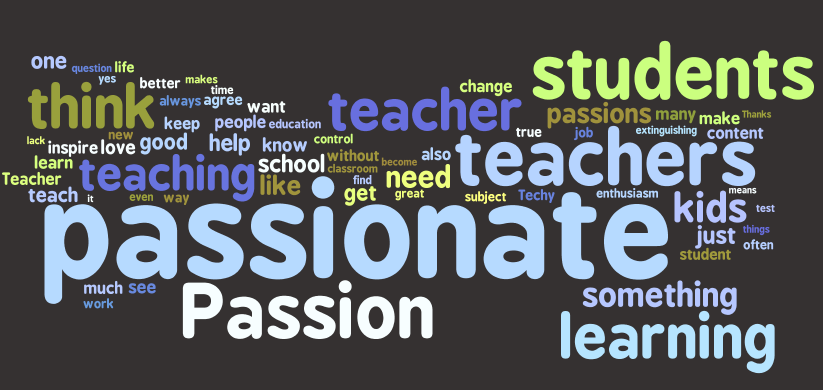
Passion in Teaching

In a post about the recent death of Jaime Escalante - the math teacher who was the subject of the 1988 film 'Stand and Deliver' - Steven W. Anderson posts this really great word cloud. Great image for any teacher!

edchat 3-30.png


Enduring Passion...

Monday, March 15, 2010

Five Days

Are you troubled by students in your classes distracted by laptops, Facebook, iPods, cellphones, text messaging, and the Internet? You might want to try this novel approach from The University of Minnesota's Heather LaMarre - challenge your students to go a 5 days without media or gadgets. Do you think Mike could do it for one day?

Toughest college test: No cell phone, no Facebook
Heather LaMarre calls her students 'the wired generation.' The University of Minnesota professor sees that they don't listen to an iPod, talk on a cell phone or surf on a laptop -- they do all three at once. She reads articles about their numbness to technology and knows that if one e-mails her at 10:30 p.m. on a Saturday and she doesn't write back by 11:30, he'll freak out.

So she did something about it.

Last week's class assignment: Five days without media or gadgets that didn't exist before 1984.
[emphasis added - MQ/KP]

Monday, February 22, 2010

Finding Photos for Your Slides

In an earlier post, we found interesting slides for our lectures. Now let's take a look at how we might create our own eye-catching slides. For this exercise, we'd like to create slides for the 10 Questions to Ponder we posted last week. We'll focus this week on photo hosting/sharing site flickr. Flickr is a great site for finding high-quality photos, as well as posting and sharing your own photos. Once you create a Flickr account, you can upload your own photos and "favorite" the photos of others.

When someone posts photos in Flickr, they have the option to make them public or private and to license them. The licenses range from "All rights reserved" to a variety of "Creative Commons" licensing. Let's talk a little bit about some of the "Creative Commons" licensing options--in particular, some of the terms we encounter.
  • "Attribution" is present on all; this term means that we must cite the source of the photo - in this case the Flickr user.

  • "NonCommercial" means that we can't make any money from the use of the image - is anyone paying for your PowerPoints?

  • "ShareAlike" licensing requires that any modifications we make to the photo be shared back with the community (i.e. Flickr).

  • Finally, "NoDerivs" means that we are prohibited from creating derivatives works from the photo - for example recoloring or altering the photo to create an entirely new version.

Within Flickr, we can navigate to "Advanced Search" and limit our search to "Creative Commons" licensed content.
flickr license2.png

If you want learn more about Flickr and some of the advanced features available in Flickr, here's a great slideshow "Flickr 101" from the Nebraska Library Commission:
Now let's dive into our 10 Questions to Ponder!

#1 How do we support the changing role of teacher?
#2 What is the role of the teacher?


These questions both deal with the role of the teacher, so we've combined them. We found this diverse set of photos by searching for terms such as "teach," "teacher," "teaching." and "professional development"
teaching - chalk.jpg teaching math.jpg
Photo by yewenyi Photo by foundphotoslj


prof devel 3.jpg prof devel 4.jpg

Photo by Barrett Web Coord Photo by Dale Basler

Now a little more on Flickr. We really like the two the photos from "superkimbo in BKK" that we included above. We can click on her username to see her "photostream" - the images she's posted to Flickr and made publicly available.
flickr contact3.png

Wow - she's posted some really great photos. We can continue to "favorite" individual photos - as we've been doing, but if we come across a Flickr user whose work we really like, we can also add them as a "contact."
flickr contact 2.png

When you add someone as a contact, you will get an e-mail every time they upload a new photo. This is a great way to keep up with their work. You'll see some great photos from user paurian later in this blog post.

Now let's get back to our questions.

#3 How do we help students discover their passions?

The first photo we found by exploring paurian's photostream; the second by searching for "students" and "passion."

inquiry student.jpg student passion.jpg
Photo by paurian Photo by orangeacid

#4 What is the essential learning that schools impart to students?

There may be better photos to describe essential learning, but searching for "light bulb" we found this image, which makes us think of spark, imagination, or idea.
light bulb.jpg
Photo by zetson

#5 What is the purpose of school?

You can find lots of pictures searching for "school" "university" or "college." This is a great photo of the Front Quad of University College, Oxford. Apparently, it's very difficult to get permission to take photos here.
oxford univ.jpg
Photo by Lawrence OP

#6 How do we adapt our curriculum to the technologies that kids are already using?

We found this photo by searching for "adapt" and "technology." This isn't one of Mike's cats.
adapting to tech.jpg
Photo by Tom Lemos

These photos we found with search terms such as "kids," "technology," and "learning."
kids and tech.jpg kids and tech2.jpg
Photo by Barrett Web Coord Photo by Phil Scoville


kids and tech 3.jpg kids and tech 4.jpg
Photo by cogdogblog Photo by cogdogblog

Searching for photos even led us to discover an image that caused us to ask a new question:

BONUS QUESTION Do we risk kids becoming addicted to technology?
tech addicted.jpg
Photo by Joits

#7 What does an educated person look like today?

We love this photo - would you have guessed that we searched for "educated?"
educated.jpg
Photo by paurian

#8 How do we change policy to support more flexible time and place learning?

Time: These images were discovered searching for "time" and "clock" - you can even try "tick tock."
time - ticktock.jpg

clocks2.jpg clocks1.jpg

Photo by Leo Reynolds Photo by Leo Reynolds

Place: These images were found with search terms "world" and "Earth."


world3.jpg world4.jpg
Photo by aussiegall Photo by strollerdos

#9 What are the essential practices of teachers in a system where students are learning outside of school?

We found lots of interesting stuff by searching for combinations of "informal," "learning," and "education."

informal learning1.jpg
Photo by misterbisson


informal learning2.jpg informal learning3.jpg
Photo by jaycross Photo by Cyprien

#10 How do we ensure those without privilege have equal access to quality education and opportunity?

To find this figure we searched for the terms "rich" and "poor."

That should get us started. Next week we combine these images with our questons to create slides - stay tuned!

Monday, February 15, 2010

Questions to Ponder

Will Richardson led a session at EduCon 2.2 focused on answering the question:
What are the ‘big’ conversations that schools should be having in relation to the ‘tectonic’ shifts that are occurring with social learning online?

From the session, Richardson was able to compile a fairly long list, from which he generated a Google Form and encouraged his blog readers to vote on the top ten. We've listed the top ten below, along with three questions that just missed the top ten. These are all great questions! Wouldn't it be wonderful to spend entire faculty days discussing some of these questions with your colleagues?

The Big Questions: Now What?
So as of today, 220 of you were kind enough to vote on what you thought were the 10 most important questions from the list that we generated at Educon. Here are the ‘winners’ at the moment:

  1. How do we support the changing role of teacher? 116
  2. What is the role of the teacher? 110
  3. How do we help students discover their passions? 110
  4. What is the essential learning that schools impart to students? 109
  5. What is the purpose of school? 102
  6. How do we adapt our curriculum to the technologies that kids are already using? 100
  7. What does and educated person look like today? 97
  8. How do we change policy to support more flexible time and place learning? 97
  9. What are the essential practices of teachers in a system where students are learning outside of school? 92
  10. How do we ensure those without privilege have equal access to quality education and opportunity? 92
And here were the next three that didn’t quite make the cut:
- What is preventing us from being adaptable to change? 79
- How do you validate or evaluate informal learning? 77
- How do we measure or assess the effectiveness of individualized self-directed learning outside of school? 68

Monday, February 1, 2010

VoiceThread - Video Conversations

A number of colleagues have been very successful using Jing to connect with their students. Here's a link to our earlier post on using Jing in the classroom. Jing takes those static text-based discussions we have in our online classes and turns them into dynamic videos that share and convey so much more information than we've been able to using email, text messaging, or discussion forums. Bob McGovern -from the English Department - has even been successful at getting his students to peer-review each others work using Jing. One limitation of Jing is that this is an asynchronous conversation - I record a Jing and send to a student; the student records a Jing response; and the process continues back and forth.

Here's a new tool - VoiceThread - that supercharges that conversation. You can upload images or video and begin a conversation by commenting on the content. You send a link or message to students and/or colleagues and they comment. Commenting can take many forms, including a telephone call, video from a webcam, audio from a microphone, text-based comments, and uploaded audio.


Imagine the potential uses. Marie Maber in Art could post images of important works and have students comment. In the English Department, students could comment on a sample paragraph or peer-review each others work. How can you use it in your discipline?

Here's a brief little VoiceThread that I created. In a matter of a couple minutes, I was able to select and upload a half dozen images from my computer and record the accompanying narration with my built-in microphone. Feel free to create a VoiceThread account and add your own comments!


Here's a brief VoiceThread explaining VoiceThread (strangely self-referential):

and another explaining how to create your own VoiceThread in 1 minute:

Followers